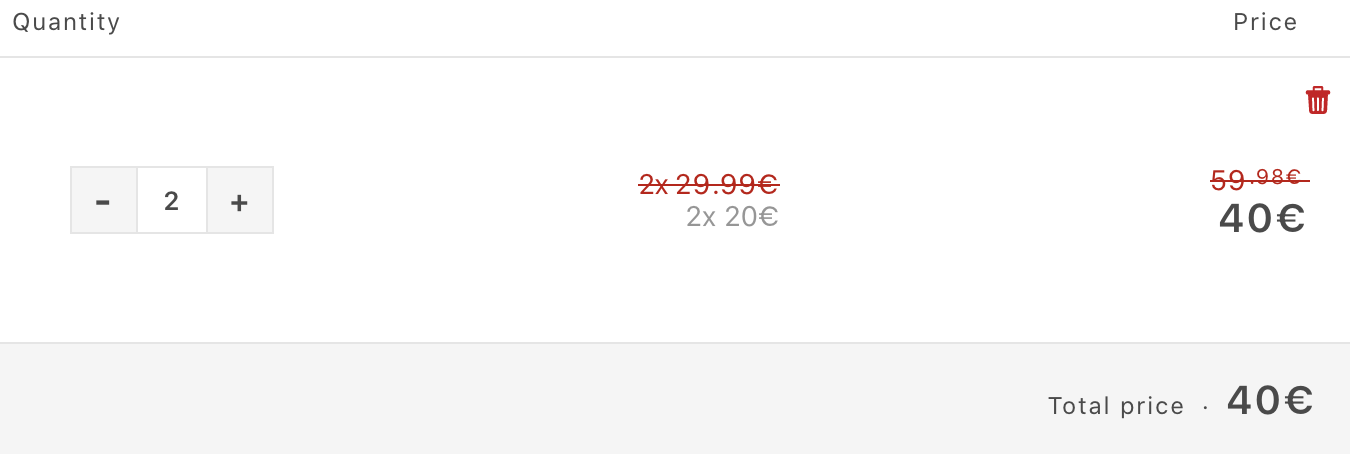
Goal: show savings for on-sale products directly in the cart, including correct totals when multiple quantities are added.
Key suggestions:
Display both the regular and discounted totals using Shopify Liquid cart item variables: line_item.price vs line_item.final_line_price (final_line_price reflects discounts).
For quantities >1, use line_item.original_line_price instead of line_item.original_price so the original total multiplies by line_item.quantity.
Update cart-template.liquid (Sections) and add CSS to style a strikethrough compare-at price (e.g., span.cart_compare_at_price) for clarity.
Issues raised:
Initial implementation only showed the single-unit original price, not the summed original total for multiple quantities.
After switching to original_line_price, one participant reported it still didn’t work on their store.
Technical notes:
line_item.* are Shopify Liquid objects for each cart line; original_line_price = original price × quantity; final_line_price = discounted total.
Venture is a Shopify theme; cart-template.liquid controls cart display.
Attached screenshot and code snippets are central to understanding the desired cart display.
Status: guidance provided, partial implementation seen, but no confirmed final resolution; remains open.
I have a question. I would like to add a price tag that says how much people save when they add a product to their cart that’s on sale. I have attached an example, which is actually an ‘automatic discount’ that applied to the cart. I just want to implement this for every product that people add to their cart when it is on sale.
I don’t see why not. If you’re referring to your cart page, you can simply show {{ line_item.price }} with {{ line_item.final_line_price }} below it. I usually look over needed objects here: https://www.shopify.com/partners/shopify-cheat-sheet
you might be using {{ line_item.original_price }} swap it for {{ line_item.original_line_price }}. line_item.original_line_price should return “line_item.original_price multiplied by line_item.quantity”.