Phishing is an attack in which someone impersonates a person or organization you trust, like your host, registrar, bank, or colleague, in order to steal information, redirect a payment, or talk you into an action that helps them. The message is the delivery vehicle, and the goal is always the next action you take.
If you run a website, you’re on both sides of this problem. Your hosting panel, domain registrar, WordPress admin, email, and payment accounts are all valuable targets, and if an attacker gets in through any of them, your site can quietly end up hosting phishing pages aimed at someone else’s customers.
In this guide we’ll walk through how phishing actually works, the forms it takes, the signals that give it away, what it does to a website’s reputation, and what to do in the first hour after you suspect you’ve been caught. If you want the shorter conceptual primer first, start with our phishing explainer and come back here for the site-owner view.
Contents:
- How does phishing work?
- What are the common types of phishing?
- How do you recognize a phishing attempt?
- Can phishing affect my website?
- How do you protect your accounts and your website?
- What should you do after a suspected phishing attack?
- Frequently asked questions
How does phishing work?
Nearly every phishing attempt follows the same four beats: a message arrives, the message creates a reason to act, you’re asked to do one specific thing, and the consequence lands somewhere you didn’t expect.
Here’s a quick hypothetical: An email appears to come from your hosting provider with the subject “Final notice: account suspension in 24 hours.” It says an unpaid invoice will take your site offline tomorrow, and it includes a “Review billing” button. The button leads to a page that looks exactly like your host’s login screen, on a domain that’s close to the real one but not the real one. You enter your username, password, and the six-digit code from your authenticator app. The page spins, then redirects you to the genuine host’s website, which looks completely normal. Meanwhile, the attacker has used those credentials and that code in real time to open a session of their own.
Notice what the lure was doing. It wasn’t really about billing. It was about compressing your decision time so you’d type a password on a page you hadn’t checked.
To be clear, receiving a phishing message doesn’t mean anything has been compromised, and clicking a link usually doesn’t either. A click can expose your IP address and browser details, and it can land you on a page that tries to exploit your browser or hand you a file, but on its own a visit to a credential-harvesting page doesn’t give anyone access to your accounts. What matters is whether you submitted something, downloaded something, or approved something. Our walkthrough of a real phishing email in How to Recognize & Avoid Phishing Emails: A Cautionary Tale shows how convincing the staging can be when you see it step by step.
What are the common types of phishing?
It helps to separate two things that often get mixed together: how an attacker targets you, and how the message reaches you.
Targeting is the difference between bulk and bespoke. Mass phishing goes out to huge lists and plays the odds with generic branding, generic urgency, and no idea who you are. Spear phishing is written specifically for you. It names your host, your plugin stack, your agency, or the client whose invoice you’re waiting on. Attackers research spear-phishing targets using whatever is public. This could be your site’s team page, WHOIS data, LinkedIn, past press coverage, even the contact form confirmation that tells them who answers it. Language tools have made that kind of personalization cheaper and the writing cleaner, which mostly means one old heuristic is weaker than it used to be: bad grammar is no longer a reliable tell.
Delivery is the channel, and there are several:
- Email: Still the most common, often with a spoofed sender name or a lookalike sending domain. Weak email authentication on your own domain makes you easier to impersonate, which we covered in Missing DMARC Records Lead to Phishing.
- SMS and chat apps (“smishing”): Where the short format hides the real destination behind a shortened link.
- Voice calls (“vishing”): Including calls that claim to be your host’s support desk and ask you to read back a code “to verify your identity.”
- QR codes: Printed on notices, invoices, or stickers, which move the link out of your email client, away from any link scanning it does, and onto your phone.
- Collaboration tools: Like Slack or Teams, where a message from a compromised internal account carries far more trust than an outside email ever would.
The channel changes the signals you can check. The underlying request for credentials, a code, a payment, or a file rarely changes.
How do you recognize a phishing attempt?
Start with the request rather than the appearance. Most phishing asks for one of four things, and all four deserve a pause:
- A link that takes you to a login screen you didn’t go looking for.
- A one-time code or an approval prompt. Nobody legitimate needs your authenticator code read aloud or pasted into a chat.
- A payment, or new payment details. Changed bank instructions on a familiar invoice are a classic.
- A file or an install. An attachment, a “required update,” a plugin ZIP from outside the repository.
Then look at the context. Was it unexpected? Does it create a deadline, a penalty, or an emotional hook? Does the sending domain match the organization exactly, character for character? Hover the link and read the actual host before the first single slash, since that’s the part your browser obeys.
Three assumptions are worth correcting here, because all three get people caught.
HTTPS doesn’t prove trustworthiness. The padlock means the connection is encrypted, nothing more; certificates are free and attackers use them routinely. Polished writing doesn’t prove authenticity either. Correct spelling, real logos, and accurate account details can all be copied or researched, and conventional multi-factor authentication, while absolutely worth having, isn’t a force field. A phishing page that proxies your login in real time can capture your SMS or app code and use it within its validity window, and an attacker who steals a valid session cookie can sometimes skip the login step altogether.
Verification is the habit that holds all of this together. Don’t verify using the message. Open a new tab and type the address or use your own bookmark, or call the number printed on your card or on the contract you already have. If a colleague sends an unusual payment request, call them back on a number you already had. It’s a thirty-second detour that defeats most of the attacks you’ll see.
Can phishing affect my website?
Yes, in two distinct ways, and the second one surprises people.
The first is direct. If an attacker phishes your hosting, registrar, FTP/SFTP, or WordPress administrator credentials, they have the same access you do. That’s enough to add an admin user, upload a file, change DNS, or install a malicious plugin. Some phishing attacks target site administrators for exactly that reason, arriving as a fake security notice or a fake required update.
The second is that your site becomes the hosting infrastructure for someone else’s phishing. Attackers commonly drop a convincing replica of a bank, courier, or webmail login into a subdirectory of a legitimate site (something like /wp-content/uploads/.cache/secure-login/) and leave the homepage completely untouched. Why? Because a real domain with real history is less likely to be filtered than a brand-new one. You can browse your site all day and see nothing wrong.
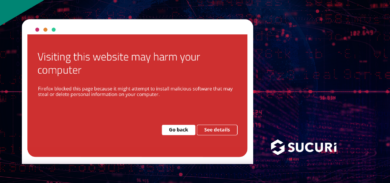
The fallout is real even though your pages look fine. Browsers can show a deceptive-site warning to your visitors. Your domain can be flagged by blocklists and reputation services, which hurts search visibility and, worse, email deliverability. Your host may suspend the account to stop the abuse. Payment processors notice. And if your customers get the warning screen, you’re explaining it to them whether or not you understand it yet.
If that’s your situation right now, our dedicated walkthrough covers the cleanup in detail.
How do you protect your accounts and your website?
Split this into two lists, because they’re maintained by different habits.
People and team practices
- Use a password manager, and give every service its own password. A manager also quietly checks the domain before it autofills, so it won’t offer your host’s credentials to a lookalike site.
- Turn on multi-factor authentication everywhere it’s offered, and prefer app-based codes over SMS where you have the choice.
- Where a service supports passkeys or FIDO security keys, use them for your highest-value accounts. These are bound to the real site’s domain, which means a lookalike page has nothing useful to collect.
- Agree on one rule for money and credentials: any request to change payment details, send funds, or share a login gets verified by a call-back on a number you already had. Put it in writing so nobody feels awkward enforcing it.
- Protect the recovery path too. An attacker who can reset your password doesn’t need to phish it, so keep recovery email and phone numbers current and locked down.
Website controls
- Keep core, themes, and plugins updated, and remove what you don’t use. Unmaintained code is how a phished credential turns into persistent access, and how an unphished attacker gets in anyway.
- Apply least privilege. Most contributors don’t need Administrator. Fewer admin accounts means fewer accounts worth phishing.
- Monitor for change. Server-side scanning and file integrity monitoring compare what’s on disk against what should be there, which is how hidden directories get noticed before a blocklist notices them for you.
- Put a web application firewall in front of the site to filter malicious requests and help block exploitation attempts against known vulnerabilities.
On our own tooling, worth being precise: SiteCheck is a remote scanner, so it examines publicly accessible content. That makes it fast and free to run, but a clean remote result can’t establish that every file on your server is clean. A phishing kit sitting in an obscure path with nothing linking to it may simply not be reachable from outside. Server-side scanning and file integrity monitoring look at the files a remote scan can’t see; malware removal addresses what’s found; a WAF reduces the exposure that let it happen. Together those layers lower risk considerably. None of them, ours included, can promise complete protection.
For a fuller treatment of the defensive side, see How to Protect Your Website from Phishing.
What should you do after a suspected phishing attack?
Match the response to what actually happened. Over-reacting wastes a day; under-reacting leaves someone logged in.
You only clicked the link. Close the tab. Don’t enter anything. Clear the site’s cookies if you’re unsure whether you were already logged in to the real service in another tab, then log in to that service directly and check recent activity. No credentials submitted usually means no further action, but stay alert for a follow-up call or message, since a click sometimes confirms to the sender that you’re a live target.
You submitted credentials. Move quickly, in this order:
- Change the password by going to the legitimate service yourself (typed address or bookmark, never the link in the message).
- Change it anywhere else you reused it.
- Revoke active sessions and sign out all devices, so a stolen session cookie stops working.
- Review MFA enrollments and remove any device or app you don’t recognize.
- Check recovery email, recovery phone, and, for email accounts, forwarding rules and filters. Attackers often add a quiet forward to keep reading your mail after you’ve changed the password.
- If the account touches your site (host, registrar, CMS admin, SFTP), assume the site needs checking and go to the next step.
You downloaded or ran a file. Disconnect the machine from the network, run a full scan with reputable endpoint software, and treat every credential stored in that machine’s browser as exposed. Change them from a different, known-clean device. If it’s a work machine, tell your IT contact before you clean anything, because they may want to look first.
You found a phishing page on your own site. Preserve what you can before you start deleting: note the file paths, keep copies of the files, and pull the relevant access logs. Then look past the page itself. Deleting the fraudulent files makes the symptom disappear while leaving the cause completely intact. Sites get re-infected within days precisely this way. So: remove the malicious files, find and close the entry point, hunt for backdoors and unexpected admin users, rotate every credential involved, and only then request review from the blocklisting services and your host.
If you suspect your site has been compromised and you’d rather not work through it alone, our team can inspect the server side, remove what’s there, and help you close the hole that allowed it. Either way, the thing to carry out of this piece is the smaller habit: when a message asks you for credentials, a code, or money, verify it somewhere the message can’t reach. That one pause prevents most of what follows.
Frequently asked questions
Can you get hacked just by clicking a phishing link?
Usually not. A click can reveal your IP address and browser details and may land you on a page that offers a malicious file, but it doesn’t hand over your accounts by itself. Risk rises sharply once you submit credentials, enter a one-time code, approve a prompt, or run a download.
Does MFA stop phishing?
Multi-factor authentication blocks many attacks and you should use it everywhere, but it isn’t absolute. A real-time phishing page can capture and replay your SMS or app code, and a stolen session cookie can bypass login entirely. Passkeys or FIDO security keys, where supported, resist that far better.
What should I do if my website is hosting a phishing page?
Record the file paths and save copies and logs first, then remove the malicious files. Next, find the entry point, hunt for backdoors and unknown admin users, and rotate every related credential. Deleting the pages alone leaves the vulnerability and attacker access in place, which invites reinfection within days.





![Malware comes in many different varieties. Analyst Krasimir Konov is on this month’s Sucuri Sit-Down to help keep them all straight. From malicious iframes to SEO spam, join host Justin Channell as he racks Krasimir’s brain on all the different types of malware. Also, Krasimir discusses his recent blog post about a malicious cURL downloader, and Justin breaks down the latest website security news, including patched plugins you should update. Podcast Transcript Justin Channell: Hello, and welcome to the Sucuri Sit Down. I'm your host, Justin Channell, and this is a monthly podcast about website security, where we get in-depth with the malware removal experts here at Sucuri. Later in the show, I'll have our analyst Krasimir Konov to chat about some different types of malware, but first, let's take a look at other topics we've published on our blog and Sucuri labs notes this month. First up, we have some new information about credit card skimming with hackers using a hybrid method to steal payment information from eCommerce websites. Our analyst Dennis Sinegubko wrote about this for the Sucuri blog back at the beginning of June. Now, most credit card stealing malware is a client side JavaScript that grabs data and sends it to a third party server. But, that approach has a drawback for bad actors because it's still possible to track the requests and catch them as being suspicious. Now, to get around that, bad actors have started harvesting information server side by modifying core PHP files. In this case, the infection would be undetectable from the outside, but it's still going to be pretty easy to find because you're rarely modifying any of those core files, so any of those changes that are going to come up are going to be suspicious. To get around both of these drawbacks, we're seeing bad actors combine the two. So client side snippets of JavaScript are sending stolen credit card data to server side scripts that they've installed on the same server as the site. Now, this allows bad actors to cover their tracks a little bit because the traffic that's being redirected is going to the same server, and that's less likely to be flagged as suspicious. It's a bit more complicated to pull this off, but our team has been seeing this hybrid approach in the wild, so it's something to be on the lookout for. Now, another month has passed, and we found more cross site scripting attacks targeting WordPress plugins. Most notably, we discovered one that affects users of the YITH WooCommerce Ajax Product Filter plugin. Now, this is a plugin that allows WooCommerce stores to be filtered by product type, and it's pretty popular. It's got about 100,000 users right now, so with it being vulnerable, it's very important that all of them update to the latest version, which is 3.11.1. Some of the other plugins we found cross site scripting vulnerabilities with included Elementor Page Builder, Careerfy, JobSearch, and Newspaper. If you're looking for a full list of vulnerabilities that have been patched this month, John Castro at the Sucuri Labs blog has you covered. Check out our show notes for the link. Also, this month I had a blog go up detailing what's called a jibberish hack. It's basically the same motivation as an SEO spam attack where bad actors use your site's good standing to redirect visitors to their own sites. But in this attack, you'll find a bunch of randomly named folders filled with a ton of HTML files with really nonsensical file names like cheap-cool-hairstyles-photos.html. It's just going to be a mishmash of keywords that clearly you didn't put there. Unfortunately, just deleting all those HTML files and folders is not going to be enough to get rid of that jibberish hack though. You're going to need to fully clean any hacked files and database tables, and then you're going to have to deal with all the damage caused to your site's standing. And just keep in mind, if you find anything about that process too daunting, we're always here to help. Now, for this month's Sit Down, we have Sucuri analyst Krasimir Konov. Earlier in June, he had written a lab's note about a malicious downloader script that used the curl function, and we chatted a bit about it, but more importantly, we went really in-depth on all the different varieties of malware that website owners need to be aware of. But, before I get started with Krasimir, I just wanted to remind you about the Sucuri Sync-Up, our sister podcast. It's a weekly website security news briefing that you can find anywhere you get your podcasts, as well as the video version on our social media feed, and now you can even get it on your Amazon Alexa smart speakers. Just search Amazon skills for Sucuri Sync-Up, add the flash briefing, and get new content delivered every Monday. Now, on with the show. Hi Krasimir, thanks for joining us on the show. I thought we could start off and maybe have you tell us a little bit about yourself and what you do here at Sucuri? Krasimir Konov: Yeah, sure. Well, I joined Sucuri originally in 2014, but I've been in the IT business for about 10 years. Nine of those I did security. And currently at Sucuri I'm one of the malware analysts. I used to work in the front lines, used to clean websites and whatnot, and then I gradually moved up, and now I'm working in the malware research department. And my day to day job is basically analyzing malware, and then once I analyze it and figure out what it is, then I will create a signature for it. And we'll add those signatures to our tools, so we can automate some of the work we do. And I also write some Labs Notes blog posts. Usually, if I find something interesting in malware or some security topic, I'll write about it. Justin Channell: Yeah. And of those topics recently that you wrote about, one was about a malicious curl downloader, and how exactly did that work? Krasimir Konov: Right, yeah. That was an interesting one, but not very unique or anything like that. We see that a lot with curl being used as a downloader. It's a very common malware. So rather than including the actual malware in the file, the attackers would use curl to download the malicious code. In this case, they'll download it from Pastebin, but it could be anything. It could be another website or anything like that, and curl would just make a call to the website, request the code. The website will respond with the code, and then later on, there is some code to either save the output somewhere on the website, or you'll just run it through eval and execute the actual code right away. Justin Channell: Right. And you said that it's commonly found in malware, but let's kind of maybe talk a bit broader about malware in general. What is everything that is classified as malware? Krasimir Konov: Well, in general it will be anything that the owner of the website didn't authorize, anything that was added by a third party. There is a lot of different malware. It could be even something like a defacement that will also be considered malware because it was something the user did not authorize. Even though it might not be doing anything malicious on the website, it's not infecting users, the visit is still something they did not authorize. So defacement would also be considered malware. And even something like ransomware where the website is technically not really damaged, it's all encrypted, but it's not infecting anybody. It's not doing anything malicious, but it's still encrypting the entire website and asking the user or the customer, the owner of the website for a ransom they need to pay in order to get the website back online. Justin Channell: Okay. Let's maybe break it down to each individual type of malware. For example, what would be a way that maybe I-frames could be maliciously used by a hacker? Krasimir Konov: Yeah. An I-frame can be used maliciously when it loads content from another location. You can look at the I-frame as a window that just opens another website. So anything that website has on it, you're pretty much loading it through the I-frame. So if that website is infected and it's serving some kind of malware, by opening an I-frame, you're loading all those elements, everything that was on this website. And sometimes the I-frame can be as small as pixel or something hidden somewhere off the screen, so you wouldn't even know that it was opening it. Justin Channell: And yeah, I feel like we've also seen a lot of them where they're used almost to mimic popups as well. Krasimir Konov: Yeah. I mean the I-frame, it could just load from another website and the other website could do anything. It could be serving just malware and it would try to infect the user that doesn't even know that they're being connected to the other website. It could just have some other JavaScript that's just trying to open up pop ups on the original website through the I-frame. Yeah, it could be a lot of things. Justin Channell: Okay. And also, let's talk a little bit about conditional redirects and how those work. What allows a script to detect which devices are coming in and where they're coming from? Krasimir Konov: Right. Yeah. That's a common one we see a lot. Basically, a conditional redirect would be something, it's a redirect on the website. It's obviously malicious, but there's certain conditions that need to be met before the redirect is actually executed or the redirect happens. For example, let's say if it's on a phishing website or a phishing page that is hidden somewhere on the website. For example, if Google visits it, obviously the attacker doesn't want Google to see the actual phishing page and record it as a phishing page. So they'll look for, for example, the IP address. They would look for the user agent. And a lot of times they can tell that it's a bot. So they'll just return a 404 response, for example, that will be like, "Oh, page not found." So Google would be like, "Oh, it looks like this page doesn't exist." But then if a regular user goes to the same page, then those conditions will be met. The actual website or the script behind the phishing will check and see, and be like, "Oh, this one is running Firefox or Chrome," and be like, okay. And then they'll look at the IP and be like, "Oh, he's in whatever, he's in United States somewhere." And he's like, "Oh, okay. That's good." And then once all of these conditions are met, then the actual script will serve them the actual phishing page. And it'll be like, "Oh, you need to fill out this to recover your account or whatever, or type in your credentials to log in here." Justin Channell: And so this is the type of thing we're really, a website owner is going to run into this more commonly when people are complaining about they're getting served bad content or whatever, and they can't seem to replicate it. It's likely probably these kind of redirects. Is that right? Krasimir Konov: Right, right. It could be something as specific as, for example, a range of IP addresses that correspond to an ISP or maybe let's say a country. It could be like, "Oh, were targeting only customers in the US," so if you're connecting from another country and you go to the same website or the same page, it would just say 404. It will give you a page not found. But then if you actually have an IP address from the United States, you're connecting from the United States, then it will actually show you the phishing page. Justin Channell: Now another type of malware I feel like we see a lot here is SEO spam. We hear people talking about that. What are some of the top SEO spam keywords that you see coming through? Krasimir Konov: Yeah. We get that a lot. We see a lot of spam on websites. A lot of times attackers will use SEO spam to gain ranking for their own website. Or they'll just try to include some kind of SEO spam in links to another website that they're currently running or something. I mean, these things change all the time. So a website might be up for a week and then it'll disappear, and then they'll start another campaign. But yeah, we see that a lot. We see all kinds of keywords they use. Most common ones will be something like Viagra. We'll have like jerseys for sale. A lot of times, they'll use name brands like Nike, Rolex, Prada. We've seen even some essay writing services for some reason. I'm not sure why, but that's common. We see, for example, pharmaceuticals a lot that will use specific medicine names. They'll use all kinds of replicas, like a replica bag of this, replica this, replica that. We'd see prescription, also payday loans. And obviously there's some adult related sites and things like that keywords. Justin Channell: So pretty much anything that people are going to be searching and clicking on are probably going to be targets for SEO spam? Krasimir Konov: Right. I think a lot of it commonly is pharma related because a lot of people are looking to buy medicine online, and a lot of times will require a prescription. So a lot of people are like, "Oh, let me see if I can find this medicine that I can buy it online somewhere." They don't need a prescription. They don't want to pay to visit a doctor and whatnot, and they'll look for it. And yeah. Justin Channell: Now, whenever somebody's website does get hacked with a SEO spam attack, what kind of effect can it have on the website beyond just being defaced? Krasimir Konov: Yeah. You can have a lot of things can happen, negative things. For example, the website can be blacklisted because of the keywords. And that usually represents a big red warning when you go on the website, depending on who blacklisted it. But if it's Google, for example, you'll see a big warning and it'll tell you this website contains malware or there's something wrong with this website. So, pretty much all the traffic on the website will be gone. And then you can also lose a lot of your reputation if there is a SEO spam on the website. For example, if you were ranked in say number five for certain keywords that represent your product on Google search engines, and then suddenly you get hit with SEO spam, then all these search engines then go and visit the website. And all of a sudden they're like, "Oh, there's all these weird key words on here, all this SEO spam that's causing a lot of mixed signals." And the search engines are like, "Oh, where do we rank this website now? Do we rank them with this product that's originally what the website is about? Or do we take into consideration all these other keywords that are mixed up that are SEO spam?" So, all of a sudden your website might go from being ranked number five on the first page to being on the 10th page. And then you rank for all these other keywords that you didn't intend to. And then people search for something completely different. They're searching for jerseys or something, or now they're searching for Prada products, and then suddenly your website pops up in there. So you're not really getting any good traffic, not targeted traffic. But, yeah. Justin Channell: Okay. So in a lot of ways, the effects of SEO spam would kind of be the same for defacements or any kind of malware with the blacklisting, but it does bring that kind of unique part to it where then it can also then bring traffic that you weren't expecting from somebody searching for jerseys, for example. I had not really ever thought about that. Krasimir Konov: Right, right. Yeah. It will definitely bring some traffic. I've seen a lot of times where websites will be connected. Let's say, there was 1,000 websites that were all infected with SEO spam, and it will kind of link each other to try to bring each other up into the rankings. And so you would see a lot of strange traffic from some random websites that were, for example, that were previously infected, even if they might not be anymore. But yeah, they'll be sending traffic to you or there'll be usually search engines sending you traffic, but for the wrong keywords. People are looking for something else, so obviously they're not going to be interested in your website. They're not going to buy anything because they're not looking for that. Justin Channell: And now, so thinking of the way websites get infected, a very common way it seems to be is through phishing campaigns. What are some recommendations you have for the best ways to avoid becoming a phishing victim? Krasimir Konov: Yeah. There is some ways. I mean, it depends really on the type of attack. Obviously, a lot of people, when they think of phishing, they think, "Oh, it's just like a PayPal phishing page and it just looks like the original," but it could be more subtle. If it's just a regular page where you're just going and you get redirected to another website, obviously the first thing to look is if you have the security padlocks, make sure that traffic is encrypted. A lot of these websites don't really have any encryption nowadays. More are starting to get that with pre SSLs being issued and whatnot. But that's the first thing to look and see, make sure. Anywhere you're typing your sensitive information, you want to make sure you have the padlock to make sure everything is encrypted. Krasimir Konov: But also you want to look at the URL of the actual website you're visiting. A lot of times they'll try to hide it. So you might have to be careful and look closely. Something that might be an I will be an L or something like that. And a capital I and L might look kind of similar into your IRL, so you might miss something like that. Say, if you're looking for PayPal and it might replace the L with an I, and if you don't look closely, it might look exactly the same. And you're like, "Oh, okay, it's paypal.com," but not really. So yeah. Just pay attention to the URL, make sure it is the actual website. There's no paypal.com dot something, dot something else, dot com. Yeah. You want it to just say paypal.com, and then it'll have forward slash and something else. But yeah, it gets more complicated when you have, for example, a phishing page that's injected into a regular page. For example, you have a checkout page on a website that you're buying things from and you go through the checkout page and you're looking at where you type in your credit card information and whatnot. And you might have a phishing page that actually looks exactly like a little box that gives you where you put in your credit card number, or your name, your address, and all that. So that will be more subtle. For example, that could be also an I-frame that's just coming from another page. And it will look exactly like it's part of the website. You're on the legitimate website, but only that portion of the website is actually the phishing page. And you look at it and you're like, "Oh, okay. It looks fine. I'm just putting my credentials." So that one could be a lot harder to figure it out. Usually, if it's something like that, I look for something that looks kind of out of place. Maybe they didn't get the right font. It might not be the same as the original website or there might be something out of place, some fields that are missing or some fields that are squished into the left or the right. It looks kind of awkward. It's like, why would this be like this? The whole website looks professional. There's a pink background or something, for example, and then suddenly there's this white box in the middle. It's like, ah, it looks kind of weird, out of place. Justin Channell: So pretty much if anything looks slightly out of place, you really should double check everything at that point. Krasimir Konov: Right. Right. Yeah. Obviously there's more ways that you can check, but I wouldn't get into more technical, like inspecting elements and looking at stuff, but yeah. Justin Channell: And now another type of malware that's kind of, and it kind of plays in with whatever the other infection is, is backdoors. Can you give us some examples of what backdoors can be? It's mainly just when a hacker can get back into the site to reinfect it, but I know there are a ton of different methods. And what are some of the more common ones and then maybe some that really interesting that you've seen? Krasimir Konov: Yeah, there is a lot. They'll probably be one of the first things the hacker would do is if they compromise a website, obviously they'll try to spread backdoors and just inject code everywhere so they can get back in, even if the owner of the website or webmaster cleans it. They want to try and hide some malicious code somewhere so they can always get back in. There's many variations. A backdoor could be something as simple as a single line of code to just [inaudible 00:20:19] argument, some kind of string or something via get or post. Krasimir Konov: And then it runs into an eval, so it evaluates the code and executes it. And some backdoors are very complex and they can be included in, let's say you have a WordPress site and you have a specific login page where all the login credentials are being processed and everything else. They could even inject code into that to basically bypass the whole login mechanism so that they can just bypass everything. They don't even have to know any user. They don't have to know the password, nothing. They'll just include some lines in there, and every time they'll be just able to log in. Yeah. It gets pretty crazy. Yeah. I mean, there's all kinds of malware. There is always a malware, for example, that just targets credit cards and will just target the eCommerce websites. And they'll just try to steal the login credentials, I mean, the credit cards. They'll try to get your address, your credit card information, any kind of CVV code or whatever you typed into the billing address, everything. And then there's also malware like the backdoors that are just trying to keep the attacker in control and trying to get them back into the website. There's just so many variations of what a malicious user might want to do on a website. Some can be something as simple as just reinfecting the website. They don't want to keep control. They just want to keep reinfecting it with some kind of malware. So even if you clean it, it would just get reinfected. Some of them in the database, otherwise might be in the files. We've seen some added into a [inaudible 00:22:14] job that just keeps running on the server. There could be malware that is just a giant to, for example, attack out of websites. Like for example, a distributed denial service where they put the same malware on thousands of websites. And then they try to send traffic to one website to try to bring it down. Yeah. People try to do all kinds of stuff with websites. We've seen even some cryptocurrency mining malware that you go onto a website and suddenly your PC starts running like crazy. And you're like, what the hell is going on? Your fans turn on and the PC is 100% CPU. And it turns out that the website has some malware that's just by mining Bitcoins with your CPU and it's using all of it. Justin Channell: Wow. Okay. So one question now, the last question I have is of all the malware that you've seen, what do you think is the coolest piece of malware that you've ever seen? Krasimir Konov: I think the coolest would be the ones that are so subtle that you don't even know that it's there. For example, we've seen some that were pretty innovative. It will be just a one liner code that's just one line. And for example, it will be let's say 40-50 characters, something like that. And that's all it is. And they'll hide it somewhere in between the legitimate code. And if you don't know what you're looking for, you would never see it. It doesn't look suspicious. There is no links to some other website. There's no some kind of encrypted code or anything like that. It's just a simple one line. And then if you're just scrolling through the file looking for something, you would never see it. It just looks like all the other code. And then if you look closely, you're like, "Oh, there's this..." Look closely, and you're like, "Oh wow, this is not supposed to be there." And then you keep looking at it and you're like, "This looks really weird." And then you see that it's actually doing some malicious things and trying to evaluate some code or taking output from the outside, I mean, some input from outside, you can call it and give it code to run. Justin Channell: Well, Krasimir, thanks for coming on and talking to us for today. Krasimir Konov: Yeah. Thank you. Thank you. I'm so happy. I'm glad I was able to do this podcast and I can't wait to do another one. Justin Channell: Yeah, we'll have you on again. Thanks. Krasimir Konov: Thank you. Justin Channell: Thanks again to Krasimir for joining us here on the Sit Down. We'll be back with another episode next month. So be sure to subscribe on Apple podcasts, Spotify, Stitcher, or any podcasting platform. Also, be sure to follow us on social media at Sucuri Security and check us out at sucuri.net. That's S-U-C-U-R-I.net. I'm Justin Channell, And this has been the Sucuri Sit Down. Stay safe out there.](https://blog.sucuri.net/wp-content/uploads/2020/05/20-sucuri-podcast-blog-post_blog_image-390x183.jpg)